Spline Tool
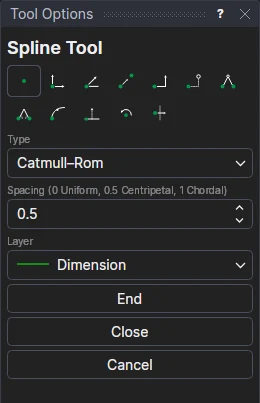
Use the Spline Tool to draw a curve through, or shaped by, as many points as you like. Choose the kind of curve with Type:
| Type | The curve |
|---|---|
| Bulge | Straight lines or arcs from point to point (a polyline). Set the Included Angle before marking each point: the segment to that point bulges by it, anticlockwise for a positive angle, straight for 0. |
| Cubic spline | The smoothest curve through every point: the same curvature either side of each, spaced by the distances between them, as CAD programs draw a spline through points. Every point shapes the whole curve. Open, it is straight at its ends (natural); closed, it is as smooth where it joins up as anywhere else. |
| Catmull–Rom | A smooth curve through every point, each piece shaped only by the points near it, so moving a point changes the curve only nearby. Spacing sets how it bends between them: 0 uniform, 0.5 centripetal (the default, which never loops or makes a cusp), 1 chordal. |
| Hermite | A curve through every point. The tangent at each is worked out from the points either side (half the step from the one before to the one after), and kept as an expression on them, so you can change it later. |
| B-spline | A smooth curve shaped by the points, which it doesn't pass through (except the first and last, when open). Degree 3 is the usual cubic; 1 joins the points with straight lines. |
| NURBS | The same curve as a B-spline, saved as a NURBS curve with its knots written out. |
A cubic spline is written to DXF as a SPLINE through its points (with the same curve as control points, for programs that use those), and a DXF SPLINE drawn through points comes back in as a cubic spline on its points.
Usage
- Choose the Type and its setting, and the layer to draw on.
- Click* the first point, then each point after it. The curve is shown as it will be, the cursor as the next point. For B-spline and NURBS the line between the points (the control polygon) is shown too.
- Finish with one of the buttons in Tool Options:
- End finishes the curve at the last point.
- Close joins it back to the first point, making a closed shape.
- Cancel throws the points away without drawing anything.
A curve needs at least two points (three to close it); a B-spline or NURBS curve needs one more than its degree.
Curves that follow the drawing
Every point is an existing point or a new one defined relative to one, so nothing is fixed in space. The curve is worked out from its points whenever they change: move a point and the curve follows. A Hermite's tangents follow the points they are made from too.
*Depending on the chosen snap mode, several clicks may be required to define the point parametrically. Read more about Snap Modes