Water-Jet Inlay Tool
Use the Water-Jet Inlay Tool to make the two cuts of an inlay in stone, tile or glass - a medallion in a floor, a logo in a worktop, the pieces of a mosaic: the piece itself, cut to fit, and the opening in the base it drops into, with the fit clearance between them.
Usage
- Draw each piece's outline as one closed element.
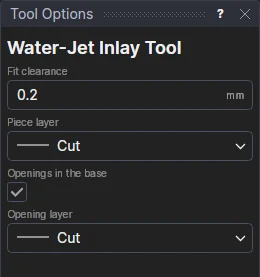
- Fill in the Fit clearance: the gap between the piece and its opening. Half comes off the piece, half goes on the opening.
- Choose the Piece layer and, with Openings in the base ticked, the Opening layer. For a mosaic of pieces that only fit each other, untick it: each piece comes in by half the clearance, so they fit together.
- Click each outline.
Each is an OFFSET of the outline (moved to the Construction layer), the clearance a variable (INC1) shared by the next pieces. The water-jet's own kerf is allowed for by the machine, or with the Offset Tool; add lead-ins with the Lead Tool.
See also: Stone and Tile, Glass.